Fast-Track Your Project Setup with Selection Imports
We’re excited to unveil a game-changing feature in BuilderPad that’s set to streamline your construction management process significantly.
With the new Selection Import feature, you can now import selection items in bulk from your selection library directly into your projects. This update is designed to save you time, reduce manual data entry, and enhance overall project efficiency.
How It Works:
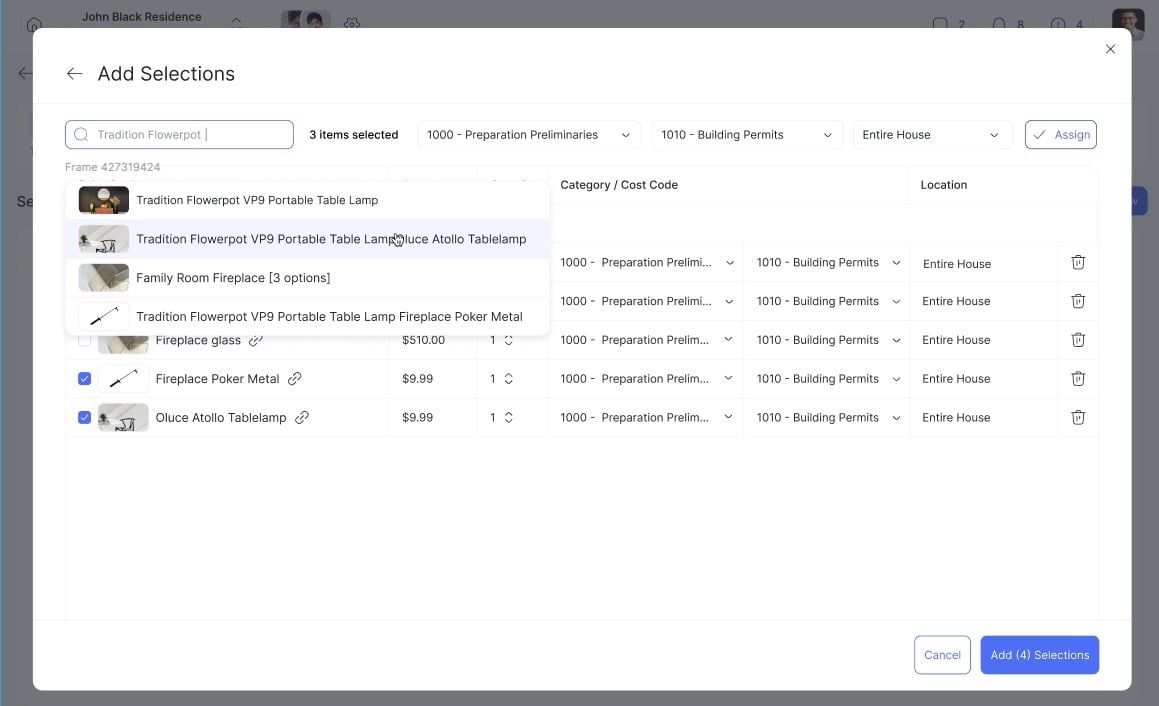
1. Access Your Library: Navigate to any project and click on “Add Item” as usual. Now, you’ll see an option to “Import item from library.” Select it.
2. Search and Select: You’ll be presented with a screen where you can search and select multiple items from your library. This flexibility allows for quick additions tailored to each project’s specific needs.
3. Customize on the Go: Assign items to a Cost Code and, if necessary, adjust the price or quantity for the specific project needs.
4. Save New Selections to Library: As you add items manually within a project, you’ll have the option to save these to your library for future use, making your setup even faster next time.
This new feature not only enhances the flexibility of BuilderPad but also aligns with our commitment to making project management as efficient and user-friendly as possible. We’re eager to see how it transforms your project setup and management processes!