Capture with Precision: Introducing Advanced Camera Controls
BuilderPad is excited to announce the launch of our Advanced Camera Controls, designed to enhance your job site documentation experience. With these new features, capturing the progress and specifics of your construction projects has never been easier or more precise.
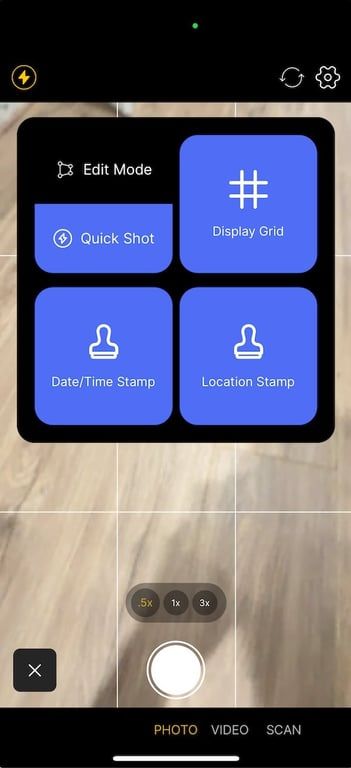
What's New in Your Camera Toolkit:
Edit vs Quick Shot Mode: Choose how you capture each moment with two distinct shooting modes. 'Edit Mode' prompts you to annotate and markup each photo immediately after capture—ideal for detailed documentation. 'Quick Shot Mode' lets you snap photos in rapid succession without interruption, perfect for fast-paced environments.
Display Grid: Activate the display grid to ensure your photos are perfectly aligned. This handy tool helps you avoid tilted shots, making your documentation clear and professional.
Date/Time Stamp: Embed a date and time stamp directly on your photos. This feature is invaluable for creating a chronological order of your project's progress, adding an extra layer of information to each image.
Location Stamp: With the location stamp feature, each photo will include latitude and longitude coordinates, pinpointing exactly where each photo was taken on the job site.
These enhancements to the BuilderPad camera are tailored for the construction industry's unique needs, offering you more control and flexibility in how you document your projects.
Why These Features Matter:
Improve Clarity: Annotations, grids, and stamps clarify details, ensuring that photos are accurately interpreted by anyone who views them.
Streamline Workflow: Whether you need to quickly document progress or provide detailed annotations, these features adapt to your workflow, saving you time and effort.
Enhance Accountability: Date, time, and location stamps on photos provide verifiable proof of work, enhancing accountability among teams and contractors.
Getting Started with Advanced Camera Controls:
Accessing these new camera features is simple. Open your BuilderPad app, head to the camera function, and you'll find the new settings in the camera interface. Customize your preferences on a per capture basis OR universally apply those settings each time to fire up the camera.