Boost Your Project Management Accuracy with the "Work Days" Feature
We're excited to introduce a new feature that will enhance your project management capabilities and ensure accurate scheduling - the "Work Days" feature! With Work Days, you can define which days of the week are considered work days, helping BuilderPad accurately display start and end dates for any construction phase or schedule item.
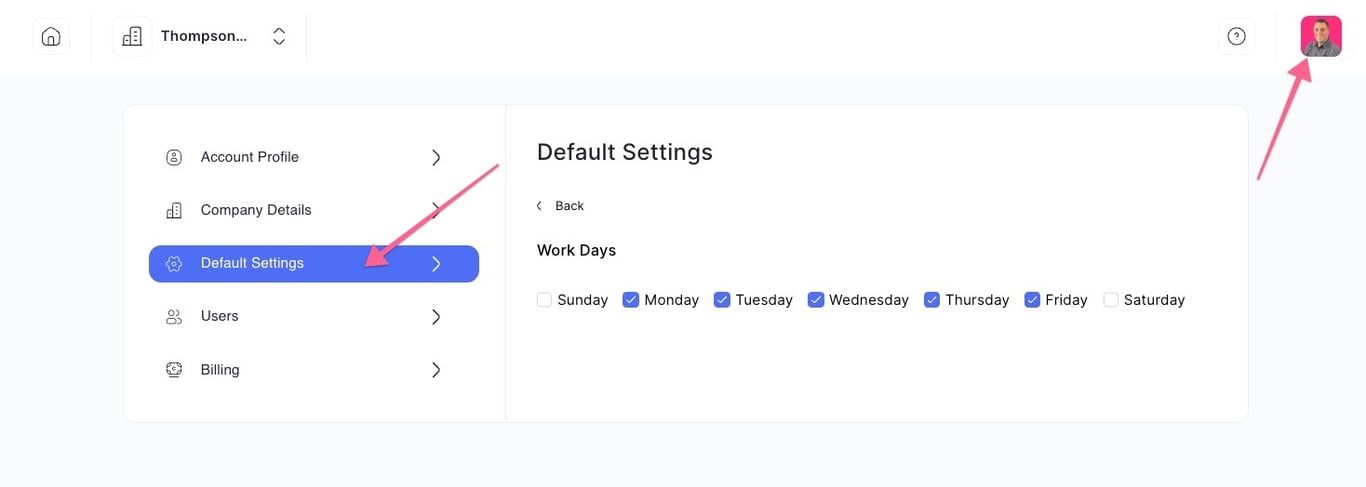
📅 How the Work Days Feature Works
For example, if you set work days as Monday - Friday and a schedule item requires 6 work days to complete, BuilderPad will show the item as scheduled to finish on the following Monday. However, if you set work days as Monday - Saturday, the schedule item will be shown to finish on Saturday instead.
🛠️ Benefits of the Work Days Feature
Accurate Scheduling: By setting your work days, BuilderPad ensures that the platform accurately displays start and end dates for all construction phases and schedule items, providing a clear and reliable timeline for your project.
Avoid Scheduling Mistakes: The Work Days feature helps project managers avoid accidentally scheduling items on non-work days, preventing potential misunderstandings and keeping your project on track.
Clear Communication: With accurate scheduling in place, your team and clients can easily understand the project timeline and plan their activities accordingly, leading to smoother collaboration and more efficient progress.
Customization: The ability to define work days according to your specific project or company requirements enables you to create a tailored project management experience that reflects your unique needs.
🚀 Start Using the Work Days Feature Today!
The "Work Days" feature is now live on BuilderPad! Log in to your account and set your work days to experience the benefits of accurate and efficient project management.
As always, your feedback and suggestions are invaluable to us. If you have any questions or need assistance, please don't hesitate to reach out to our support team.
Happy Building and Accurate Scheduling! ⚙️
The BuilderPad Team